


Disney Solitaire
4.863.41K Reviews
App Specs
- Version
- 1.26.3
- Updated On
- License
- Free
- Downloads
- 10,000,000+
- Developer
- SuperPlay.
- Categories
- Card
- Platform
- Android, iOS
Screenshots
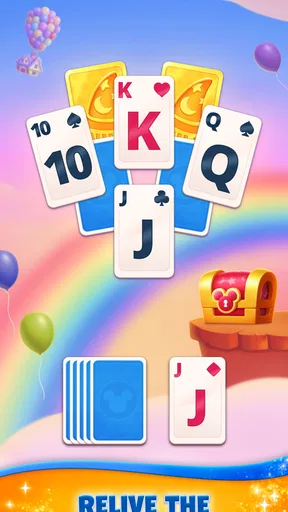
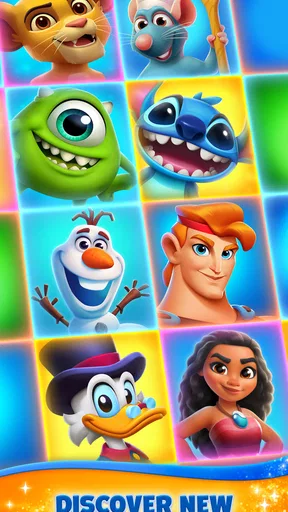
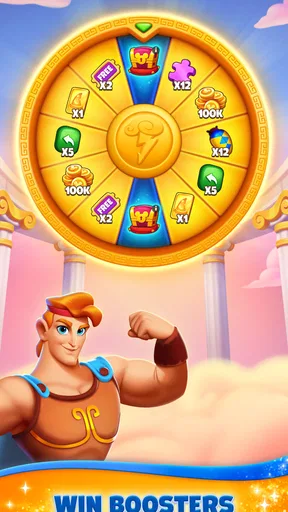
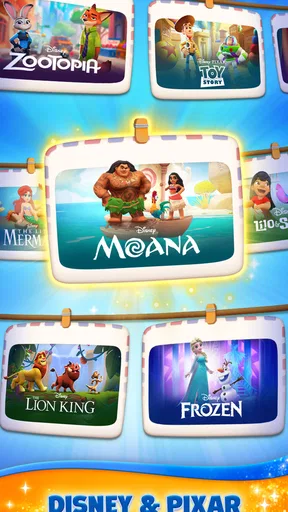

 Analysis by AppCompare
I like card games that are easy to pick up in a spare moment, and Disney Solitaire has an obvious appeal when I want familiar solitaire with a more playful presentation. It takes the patience-style card game and wraps it in Disney characters and scenes, so the appeal is as much about the atmosphere as it is about the cards. I’d recommend it most to someone who enjoys both casual card challenges and Disney’s visual world, rather than to a player looking for a deep strategy game.
A shared game for small gaps in the day
In a household where people take turns using the same phone or tablet, this is the kind of game that can fit neatly into short breaks: one person can play a round while waiting, then hand the device back without needing to explain complicated rules. The basic solitaire format is familiar, so a Disney fan who has never spent much time with mobile card games can still understand the appeal quickly. I would treat it as a personal turn-taking game, though, not as a shared family account or a cooperative activity; the enjoyment comes from each player making their own moves.
A realistic use might be a quiet stretch before dinner or a wait while someone else finishes an errand. The bright character art makes a brief session feel more cheerful than a plain deck, while the card-play structure gives you a clear activity instead of an endless feed. I find that distinction useful: it is easy to open with a purpose, play for a little while, and stop when the moment is over. If someone in the household wants a game that actively brings everyone together, a party or multiplayer title would suit that job better.
Keeping expectations clear on a shared device
If more than one person will use the device, I’d agree on whose game session it is before handing it over. That is a simple practical boundary, not a special feature: it avoids confusion about who has made progress or used any optional resources. A parent can also decide in advance whether in-app purchases are acceptable on the device. The game is free to start, but optional purchases range from $0.99 to $149.99 per item, so I would not leave spending decisions vague when children share a device.
That price range is a reason to use the device’s usual purchase safeguards and make sure everyone knows that paying is optional. You can enjoy the card game without buying anything, so I would begin that way and only consider a purchase if it solves a specific annoyance or adds something the player genuinely wants. I wouldn’t buy simply because a child asks during a difficult round; waiting until the session is over makes it easier to judge whether the purchase is worthwhile rather than reacting to frustration.
For a household with separate users, it also helps to think about account boundaries before treating one device as a common game station. I would avoid assuming that progress or preferences will be neatly separated between people unless I had checked how the game behaves on that device. The practical approach is to let one regular player keep the game, or to agree that everyone is using the same play space and should not alter another person’s session casually. That small conversation is more useful than promising a clean multi-user setup the game may not provide.
What the Disney theme adds to solitaire
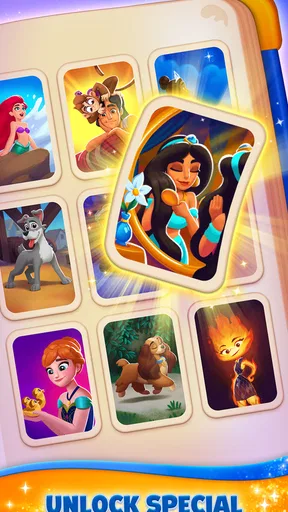
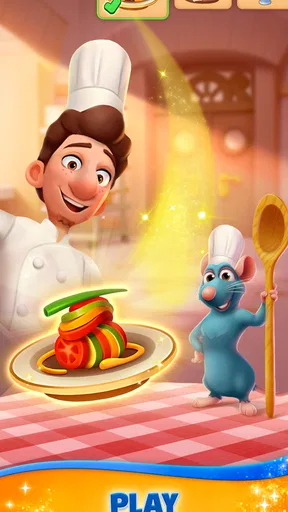
From the moment you start Disney Solitaire, you’re greeted with a vibrant interface filled with beloved Disney characters. The game’s design is visually appealing, with colorful graphics that bring each card to life. It feels like you’re stepping into a Disney movie, which is honestly a delightful experience.
Worth Reading Before You Choose

Baby Panda World Brings Quick Play to Modern Phones, but Its Game Library Feels Busy

ESPN’s Live Game View Makes Following Close Games Easier

QuizzLand Review: A Good Fit for Short Trivia Breaks, Not Every Player

Basketball Stars: Multiplayer Is Fast, but Can It Recover When Matches Go Wrong?

WEBTOON Turns Phone Updates Into a Better Reading Routine

Link to Windows Runs on Shared Habits, Not Social Feeds
Each card is adorned with familiar faces, from Mickey Mouse to Elsa, making every move a nostalgic trip down memory lane. The animations are smooth, and the transitions are seamless, which adds to the overall enjoyment.
Gameplay with a Twist
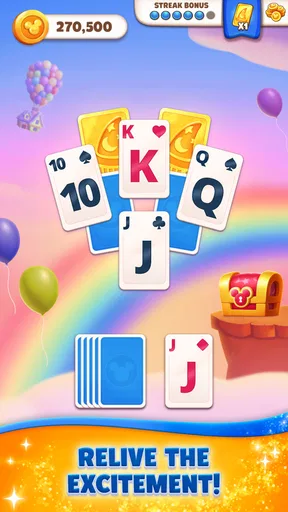
Now, let’s talk about the gameplay. If you’ve played Solitaire before, you’ll feel right at home. The rules are the same, but the Disney theme adds a refreshing twist. There are different levels, each set in various Disney-themed worlds. As you progress, the challenges increase, keeping you engaged and entertained.
One of the cool features is the power-ups. These are not just your typical power-ups; they’re Disney-themed. Imagine having a little bit of Tinkerbell’s pixie dust to help you out when you’re stuck. It's these small touches that make the game stand out.
How I’d decide whether to use a boost
My tip is to treat a power-up as a decision tool, not an automatic button to press whenever a round gets awkward. First, look for any ordinary move you may have overlooked; then decide whether the boost is worth using on this particular board. That keeps the familiar card puzzle at the center of the session and makes the themed assistance feel like a choice rather than a substitute for thinking. If you prefer a completely unassisted version of solitaire, this extra layer may feel unnecessary, but players who like occasional help may find it keeps a stubborn challenge enjoyable.
The level structure also changes the rhythm compared with a basic solitaire app that simply deals another standard game. Here, progression gives a session a destination: you are working through themed challenges rather than only playing for its own sake. I like that when I want a reason to continue, but it is also a trade-off. Someone who wants an endlessly simple, familiar deal without a sense of advancement may prefer a stripped-back solitaire game; someone who enjoys a light goal attached to each session is more likely to appreciate this approach.
Choosing it over a plain card-game alternative
Against a conventional solitaire app, the strongest reason to choose this one is not a different core card mechanic; it is the Disney presentation, themed progression, and character-focused feel. If the artwork and familiar faces make you more likely to return to a card game, that is a meaningful advantage. If you care most about a clean, minimal screen and want nothing between you and the cards, a basic solitaire alternative may be a better fit. I’d make the choice based on whether the theme makes the game more inviting for you, not on an expectation that it will replace every kind of card game.
It is also worth separating “casual” from “effortless.” The familiar rules make the game accessible, but increasing challenges can still ask for patience. I would not choose it as background entertainment if I needed a game that never asks me to think, and I would not choose it for a serious card player seeking a competitive table. Its sweet spot is a relaxed solo session with enough progression to give the next round a little purpose.
Age, trust, and a sensible first session
The game is rated Everyone, which makes its general audience broad, and I can see why its accessible card format and Disney presentation may appeal across ages. That rating does not replace a parent’s own judgement about screen time or purchases, especially on a shared device. I’d start by playing together for a few minutes, showing younger players what a normal round looks like and explaining that optional purchases are not required to enjoy the game. For older Disney fans, it can simply be a familiar, low-pressure way to spend a short break.
It comes from SuperPlay, and its scale suggests that it has found a substantial audience: it has a 4.8 average from around 310,000 ratings, with more than five million installs. Those figures may help a new player feel that this is an established casual game, but they do not tell you whether its pace or presentation will suit your household. I would use a first session to check the things that matter personally: whether the character art is enjoyable rather than distracting, whether the challenge feels fair, and whether everyone is comfortable with the game’s optional spending.
Music, mood, and when to mute the phone
The soundtrack is another aspect where Disney Solitaire shines. The music is a delightful collection of iconic Disney tunes that play softly in the background. It’s soothing and adds to the immersive experience. The sound effects are subtle yet effective, making the game feel lively without being overwhelming.
That gentle presentation makes it a natural fit for a quiet break, but it is not always the right choice in a shared room. If someone is reading, working, or trying to rest, I would lower the volume or play silently rather than assume the soundtrack suits everyone. The visual theme still carries much of the charm without sound, so muting it is an easy compromise for a common space. I also prefer not to use a game’s music as a reason to keep playing longer than I intended; deciding on a stopping point before opening it can keep a quick break quick.
Purchases and the free-to-play trade-off
Like many apps, Disney Solitaire does offer in-app purchases. While you can enjoy the game without spending a dime, there are options to buy additional decks or power-ups. It's not necessary, but if you’re someone who likes to enhance their gameplay, it’s nice to have the option.
For me, the useful question is not whether purchases exist, but whether the free experience already gives me the kind of session I want. I’d play first and keep a note of what, if anything, feels limiting before paying. A purchase tied to a specific preference is easier to evaluate than buying impulsively because a round is difficult. Since purchases can be expensive at the upper end, I would be particularly cautious about letting children browse purchase options unsupervised, even though the game itself is free to download.
Who will enjoy it, and who should pass
I’d point Disney fans who already enjoy solitaire toward this game first; the theme gives a familiar pastime a personal touch, and the levels offer more direction than a bare-bones card app. It may also suit someone who wants a gentle game to pick up in short intervals without learning a complicated ruleset. The current version is 1.11.2, and it requires Android 7.0 or later, so an older Android device should be checked against that requirement before installation. The game is also available on iOS.
I’d suggest skipping it if you dislike Disney characters, prefer a plain card table, or want multiplayer competition rather than solo challenges. It is not my first choice for a household that expects separate profiles or coordinated play, and it is not ideal if any optional purchase would create tension on a shared device. The best fit is a player who welcomes the theme, enjoys working through challenges, and is comfortable keeping spending decisions deliberate.
A household verdict
Overall, I’d say Disney Solitaire is a charming twist on a classic game. It’s perfect for Disney fans and Solitaire lovers alike. The graphics, music, and gameplay come together to create an enjoyable experience that’s hard to put down. Whether you’re looking to unwind or challenge yourself, this app offers a little bit of everything. So, go ahead and give it a whirl. You might just find yourself lost in the magic.
My household recommendation is a little more specific: install it for the person who will genuinely enjoy the Disney styling, agree on purchase boundaries if the device is shared, and treat turns as individual sessions rather than assuming the game is designed for family coordination. It is free to try and easy to understand, yet still has enough themed progression to make repeated rounds feel purposeful. For a quiet solo break it earns a place; for a group game night or an entirely no-frills solitaire routine, I’d choose something else.
Pros
- Beautiful Disney-themed graphics.
- Intuitive and smooth user interface.
- Variety of solitaire modes.
- Regular updates with new content.
- Offline play supported.
Cons
- Contains in-app purchases.
- Occasional ads can be disruptive.
- Limited customization options.
- Requires iOS 11 or later.
- No multiplayer mode available.
FAQs for Disney Solitaire
What is Disney Solitaire?
Disney Solitaire is a classic card game app that combines the strategic fun of solitaire with beloved Disney characters and themes. Players can enjoy various solitaire variations while interacting with their favorite characters from Disney movies, making it a delightful experience for both card game enthusiasts and Disney fans alike.
Is Disney Solitaire suitable for children?
Yes, Disney Solitaire is suitable for children as it features a family-friendly interface with Disney characters and themes. The game is designed to be accessible to players of all ages, offering an engaging yet simple gameplay experience that can be enjoyed by kids, teenagers, and adults.
Does Disney Solitaire require an internet connection?
Disney Solitaire can be played offline, making it a convenient option for users who wish to enjoy the game without an internet connection. However, certain features such as updates, online leaderboards, or special events may require internet access to enhance the gaming experience.
Are there in-app purchases in Disney Solitaire?
Yes, Disney Solitaire offers in-app purchases. Players can buy additional themes, card designs, and power-ups to enhance their gameplay experience. While the game is free to play, these optional purchases can provide a personalized touch and new challenges for avid players.
How does Disney Solitaire integrate Disney themes into the gameplay?
Disney Solitaire integrates Disney themes by incorporating characters, music, and settings from various Disney movies. Each level or theme may feature different Disney classics, offering a visually appealing and nostalgic experience. This integration enriches the traditional solitaire gameplay with a magical Disney twist.


